📋 In Brief
ChatGPT is transforming survey creation: gone are the hours spent formulating questions and structuring your surveys. Drag’n Survey natively integrates OpenAI’s AI to support you every step of the way.
- Instant creation: describe your need, ChatGPT generates the survey
- Conversational editing: modify your questions by chatting with the AI
- Intelligent analysis: query your results as if you were talking to a colleague
Creating a survey can be a daunting challenge, especially when starting from a blank page. Thanks to the integration of ChatGPT artificial intelligence into Drag’n Survey, creating surveys is easier and faster than ever. With this strategic partnership, the French leader in online surveys is revolutionizing the survey creation experience.
Discover how this integration simplifies and speeds up the design of your surveys while offering an optimal user experience.
>> To create a ChatGPT survey with Drag’n Survey, click here

Why Use ChatGPT to Create a Survey
Creating a professional survey has long been reserved for experts. Finding the right questions, avoiding bias, logically structuring the survey. These skills are acquired through experience. ChatGPT changes the game by democratizing access to this expertise.

Writer’s Block Finally Solved
Who hasn’t stared at a blank survey, not knowing where to start? ChatGPT is the best solution in this situation. OpenAI’s AI has been trained on millions of documents, including survey methodologies, formulation best practices, and proven survey structures.
When you describe your objective to ChatGPT, the AI instantly mobilizes this knowledge to propose a coherent structure. It anticipates relevant questions, suggests appropriate response formats, and organizes the logical flow of the survey.
Methodological Expertise Accessible to All
Survey professionals spend years mastering the art of questionnaire design. Which questions to ask first? How to avoid formulation bias? When to use a <u>Likert scale</u> rather than multiple choice?
ChatGPT incorporates this methodological knowledge. The AI knows that a closed question at the beginning of a survey facilitates respondent engagement. It understands that a leading question skews results. It masters the subtleties between a Net Promoter Score and a classic satisfaction scale.
Considerable Time Savings
Creating a customer satisfaction survey typically takes between 2 and 4 hours for an experienced professional. With ChatGPT, this time drops to just a few minutes. The AI generates a complete first version that you then refine according to your specific needs.
This time saving frees up your energy for what really matters: analyzing results and making decisions.
ChatGPT Alone vs ChatGPT Integrated in Drag’n Survey: What’s the Difference
Many users start by asking ChatGPT to create a survey directly in the OpenAI interface. The AI then generates a list of questions in text format. It’s a good start, but this approach has significant limitations.
Limitations of Using ChatGPT Alone
No Interactive Form
ChatGPT produces plain text. You then have to manually copy each question into a form creation tool. This is tedious and error-prone.
No Response Collection
A survey only has value if it collects data. ChatGPT alone cannot distribute your survey or record responses from participants.
No Automatic Analysis
Once responses are collected (elsewhere), you have to analyze them manually. ChatGPT cannot access your data to extract insights.
No Advanced Question Types
ChatGPT can suggest using a rating matrix or satisfaction slider, but it cannot technically create them. You get a description, not a functional interactive element.
The Advantage of Native Integration in Drag’n Survey
Drag’n Survey has integrated ChatGPT directly into its platform. This integration transforms AI capabilities into concrete, usable features.
Direct Form Generation
When ChatGPT creates a survey in Drag’n Survey, it directly generates interactive elements: checkboxes, dropdown menus, rating scales, text fields. The survey is immediately functional.
20 Question Types Available
OpenAI’s AI has been trained on Drag’n Survey’s model. It knows the 20 available question types and when to use each one: single choice, multiple choice, matrix, NPS, rating bar, file upload, integrated calendar…
Automatic Conditional Branching
ChatGPT can create intelligent survey paths where displayed questions depend on previous answers. These conditional branches, complex to configure manually, are automatically generated by the AI.
Scoring and Calculators
For quizzes and assessments, ChatGPT automatically configures the point system and final score calculation rules.

The 3 Moments When ChatGPT Intervenes in Drag’n Survey
The integration of ChatGPT in Drag’n Survey isn’t limited to initial creation. OpenAI’s AI supports you throughout your survey’s lifecycle.
1. At Creation: From Idea to Survey in Minutes
The first level of integration concerns survey generation. You simply describe what you want to achieve, and ChatGPT does the rest.
How Does It Work Exactly?
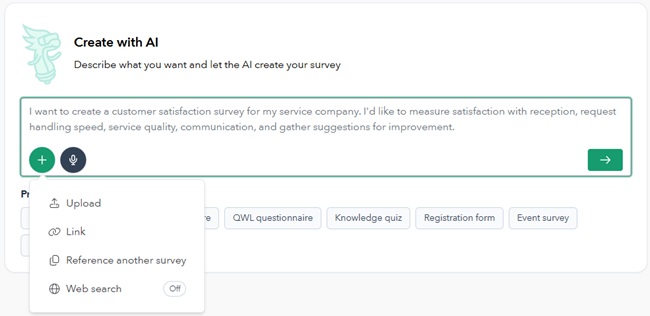
When you create a new survey on Drag’n Survey, you can choose the “with artificial intelligence” mode. A text area appears where you describe your need: the survey topic, your target audience, the objectives you’re pursuing.
The description can be very detailed. You can write the equivalent of six Word pages to explain precisely what you expect. The more complete your brief, the more relevant the generated survey will be. You can also upload documents (JPEG, PDF, Word, PowerPoint, Excel, etc.), enter a URL, ask ChatGPT to do a web search, or base it on an existing survey. All these options can be combined to create a 100% customized survey.
Example of an Effective Prompt
“I am an HR manager in a company of 200 employees. I want to create a survey to measure workplace well-being following our switch to hybrid mode (3 days office, 2 days remote). I want to evaluate: overall satisfaction, work-life balance, quality of remote work tools, relationships with colleagues and management. The survey must be anonymous and take less than 10 minutes to complete.”
In seconds, ChatGPT generates a structured survey with appropriate question types, logical progression, and neutral wording.
2. At Editing: Modify Your Survey Through Dialogue
Once the survey is created, you can continue to interact with ChatGPT to modify it. No more navigating through menus or searching for the right options: you simply ask for what you want.

Complex Modifications Made Simple
Certain modifications that took several minutes in manual mode are done instantly with a simple instruction to the AI.
Examples of requests that ChatGPT understands and executes:
- “Add a question about frequency of use of our services in position 3”
- “Change question 5 to a scale of 1 to 10 instead of 1 to 5”
- “Make the email question mandatory”
- “Add a branch: if the respondent is dissatisfied, redirect them to an open question to understand why”
The AI That Understands Context
ChatGPT doesn’t just execute orders mechanically. The AI understands the context of your survey and can make relevant suggestions.
If you ask “Improve question 7,” ChatGPT analyzes the current wording, identifies potential biases or ambiguities, and proposes an optimized version with an explanation of its choices.
3. At Analysis: Dialogue with Your Data
This is perhaps the most powerful use of ChatGPT in Drag’n Survey: the ability to converse with your survey results as you would with an analyst.

Ask Your Questions Naturally
Once responses are collected, you can query ChatGPT about your data:
- “What is my NPS score and how does it compare to my industry?”
- “What are the main reasons for dissatisfaction emerging from the comments?”
- “Is there a correlation between respondent tenure and their satisfaction level?”
- “What are the 3 priority actions to implement based on these results?”
Real Analysis, Not Just Reformulation
When you ask a question about your data, ChatGPT doesn’t just reformulate the numbers. The AI performs real statistical calculations in the background: averages, standard deviations, correlations, segmentations.
You can follow up on answers, delve deeper into a point, ask for clarifications. A real analytical conversation begins, allowing you to explore your data from all angles without mastering statistical tools.
Contextual Analysis and Recommendations
ChatGPT goes beyond simple number reporting. The AI contextualizes your results relative to your industry and proposes actionable recommendations.
If your NPS is 32, ChatGPT will explain that it’s a decent score for retail but insufficient for SaaS, and will suggest specific areas for improvement based on your detractors’ verbatim comments.
Practical Guide: Create Your First ChatGPT Survey with Drag’n Survey
Let’s get practical with a step-by-step tutorial to create your first AI-assisted survey.
Step 1: Create a Free Account
Go to Drag’n Survey and create your account in seconds. No credit card required. The free version allows you to create surveys with up to 20 questions and collect 200 responses, which is sufficient for most uses.
Step 2: Launch Creation with ChatGPT
From your dashboard, click “Create a survey.” Three options are available: start from scratch, use a template, or create with artificial intelligence. Select the latter option.
Step 3: Describe Your Need
A text area appears. This is where you explain to ChatGPT what you want to create. Be as specific as possible:
- What is the objective of your survey?
- Who are the targeted respondents?
- What information do you want to collect?
- How long should the survey take?
- Are there any specific constraints (anonymity, mobile format, etc.)?
Step 4: Generate and Refine
Click “Generate.” In seconds, ChatGPT creates your complete survey. Review it to verify it meets your expectations.
If adjustments are needed, use the editing assistant to request modifications: “Add a question,” “Delete question 4,” “Reword question 7 more neutrally.”
Step 5: Customize the Appearance
Add your logo, choose your brand colors, select a background image if you wish. A survey in your brand colors inspires more trust in respondents.
Step 6: Distribute and Collect
Drag’n Survey offers several distribution modes: web link to share, integrated email campaign, QR code for your physical materials, widget to embed on your site. Choose the channel suited to your target audience.
Step 7: Analyze with ChatGPT
Once responses are collected, go to the analysis interface. Activate the AI assistant and start dialoguing with your data. Ask your questions, request clarifications, explore insights.

10 Prompt Examples to Create Different Types of Surveys
The quality of the generated survey largely depends on the quality of your initial description. Here are examples of effective prompts for different use cases.
Customer Satisfaction Survey
“Create a satisfaction survey for customers of my gourmet restaurant. I want to evaluate: reception, food quality, value for money, atmosphere, service. Include an NPS question and an open question for suggestions. Maximum 12 questions.”
Employee Satisfaction Survey
“I am the HR Director of an SME with 80 employees. Create an annual employee satisfaction survey covering: working conditions, management, career development, compensation, team atmosphere. The survey must be 100% anonymous and take less than 15 minutes.”
Training Assessment Quiz
“Create a 15-question quiz to assess training outcomes. Mix single choice, multiple choice, and true/false questions. Display the correction after each question and calculate a final score out of 100.”
Market Research
“I’m launching a healthy meal delivery app. Create a survey to understand the eating habits of my target audience (25-45 years old, urban, upper-middle class). I want to know: order frequency, average budget, selection criteria, current barriers, interest in my concept.”
Event Registration Form
“Create a registration form for our annual company seminar (150 expected participants). Collect: contact details, workshop choices (3 time slots with 4 options each), dietary restrictions, accommodation needs, transportation. Add payment via Stripe (€150 per person).”
360° Evaluation
“Create a 360° evaluation survey for our managers. Evaluators (supervisors, peers, direct reports) must rate: leadership, communication, team management, decision-making, employee development. Use scales of 1 to 5 with behavioral descriptors.”
Opinion Survey
“Create a survey for our neighborhood association about the central square redevelopment project. Present the 3 scenarios proposed by the city and gather residents’ opinions: preference, improvement suggestions, priorities (parking, green spaces, commercial terraces).”
Medical Survey
“Create a pre-consultation survey for a physiotherapy practice. Collect: patient information, reason for consultation, medical history, current treatments, pain level (visual scale), pain location (body diagram if possible), patient goals.”
Post-Purchase Feedback
“Create a short survey (5 questions max) sent automatically 7 days after a purchase on our organic cosmetics e-commerce site. Evaluate: product satisfaction, delivery quality, repurchase intention. End with a Google review request with direct link.”
Internal Audit
“Create a cybersecurity compliance audit survey for employees. Evaluate: knowledge of risks and security measures.”
ChatGPT: How Drag’n Survey Protects Your Data
Using ChatGPT legitimately raises questions about data protection. Drag’n Survey has implemented a strict contractual framework to ensure your compliance.
No Training on Your Data
Drag’n Survey has negotiated a specific agreement with OpenAI: the data you transmit through the platform is never used to train AI models. Your surveys, your participants’ responses, and your analyses remain strictly confidential.
Retention Limited to 30 Days
OpenAI has contractually committed to retaining data for a maximum period of 30 days, solely for moderation and abuse detection purposes. After this period, data is deleted from OpenAI’s servers.
Total Transparency
Drag’n Survey clearly informs its users about the use of OpenAI’s AI and the protection measures in place. This transparency allows you to inform your own respondents if necessary.
Comparison: Creating a ChatGPT Survey with Different Solutions
How does Drag’n Survey position itself against other options for creating a survey with ChatGPT?
Using ChatGPT.com Directly
Advantages: Free, direct access to the latest AI.
Disadvantages: Generates only plain text, no form functionality, no collection or analysis, manual copying required.
Verdict: Acceptable for brainstorming question ideas, unsuitable for creating a real usable survey.
Google Forms + Manual ChatGPT
Advantages: Google Forms is free and unlimited.
Disadvantages: Two-step process (generate with ChatGPT then copy into Forms), limited question types, virtually no graphic customization, data hosted in the USA.
Verdict: Stopgap solution, but inefficient workflow and unprofessional result.
SurveyMonkey with AI
Advantages: Well-known brand, numerous integrations.
Disadvantages: AI only available in high-priced paid plans, free version limited to 25 responses, American hosting.
Verdict: Expensive option that offers no decisive advantage over Drag’n Survey.
Drag’n Survey with Integrated ChatGPT
Advantages: AI accessible from the free version, 200 free responses, European hosting, 20 question types, AI assistance throughout the cycle (creation, editing, analysis).
Disadvantages: Less well-known than American giants.
Verdict: The best features-to-price ratio for creating a professional, compliant ChatGPT survey.
ChatGPT Democratizes Professional Survey Creation
The integration of ChatGPT into survey tools marks a turning point in how surveys are designed. What yesterday required specialized methodological skills and several hours of work is now accomplished in minutes thanks to artificial intelligence.
Drag’n Survey has chosen to integrate ChatGPT natively and comprehensively, covering the three key stages: survey creation, conversational editing, and results analysis. This approach transforms AI into a true work partner, accessible to everyone without prior technical skills.
Whether you’re an HR manager, research officer, trainer, quality manager, or executive, ChatGPT via Drag’n Survey allows you to create surveys in a fraction of the usual time, while benefiting from the methodological expertise embedded in the AI.
FAQ: Your Questions About ChatGPT Surveys
Can ChatGPT create any type of survey?
Yes, ChatGPT is capable of generating all types of surveys: customer satisfaction, HR survey, training quiz, market research, registration form, internal audit, 360° evaluation, opinion survey, etc. The AI adapts the structure, question types, and wording to the context you describe.
Should the survey generated by ChatGPT be reviewed?
Absolutely. ChatGPT produces excellent working bases, but human review remains essential. Verify that the questions match your objectives, that the wording is appropriate for your audience, and that nothing essential has been forgotten. AI is a powerful assistant, not a replacement for human judgment.
Can a survey be modified after ChatGPT generates it?
Yes, and it’s even recommended. In Drag’n Survey, you can modify the survey in two ways: manually via the classic interface, or through dialogue by continuing to give instructions to the AI. Both approaches are complementary.
Does ChatGPT understand French?
Perfectly. ChatGPT masters French and generates surveys in correct, professional French. You can give it instructions in French and it will produce a survey in French. It can also create multilingual surveys if you request it.
Is ChatGPT usage included in Drag’n Survey’s free version?
Yes, ChatGPT assistance for survey creation is accessible from the free version. You can generate surveys by AI, modify them through dialogue, and analyze your results with the conversational assistant, all at no cost.
Is my data used to train ChatGPT?
No. Drag’n Survey has concluded an agreement with OpenAI explicitly prohibiting the use of your data for model training. Your surveys and your participants’ responses remain strictly confidential.
What’s the difference between ChatGPT and Drag’n Survey’s multimodal AI agent?
ChatGPT is OpenAI’s AI model that powers Drag’n Survey’s conversational features. The multimodal AI agent is an additional layer developed by Drag’n Survey that goes even further: creation from files (PDF, Word, PowerPoint, Excel, Images), URL analysis, combination of multiple sources. To learn more, see our complete guide on the multimodal AI agent.
How long does it take to create a survey with ChatGPT?
A simple survey (10-15 questions) is generated in less than a minute. Allow 5 to 10 minutes for a more elaborate survey including initial generation, dialogue adjustments, and graphic customization. That’s 5 to 10 times faster than manual creation.
More about surveys:
Learn cybersecurity with quizzes, click here
Create an effective online survey, click here
Find an alternative to Google Forms, click here
Find a powerful alternative to Microsoft Forms, click here
Compare Typeform and Drag’n Survey software, click here
The 7 most effective alternatives to using JotForm, click here
10 Optimal Tools for Online Form Efficiency and Elegance, click here
Find differences between Drag’n Survey and SurveyMonkey, click here
Hook Your Students with 7 Engaging Online Survey Templates, click here
The Best Toolkit for a Comprehensive Customer Satisfaction Survey, click here
Read the article:
Polish – Stwórz ankietę online za pomocą OpenAI, click here
Portuguese – Crie uma pesquisa online com o ChatGPT, click here
German – Erstellen Sie eine Online-Umfrage mit ChatGPT, click here
French -Drag’n Surveyintègre ChatGPT des questionnaires en ligne, click here